Answer while the context is fresh.
Dictate a project update in Slack or a detailed reply in Mail. Wisp works with text fields that accept pasted text, so there is no separate document to shuttle between apps.
 wisp
Reply to the email, explain the decision, and capture the follow-up. Wisp handles the words where the work is already happening.
Mail · Slack · Notion · Messages · Calendar
Dictate a project update in Slack or a detailed reply in Mail. Wisp works with text fields that accept pasted text, so there is no separate document to shuttle between apps.
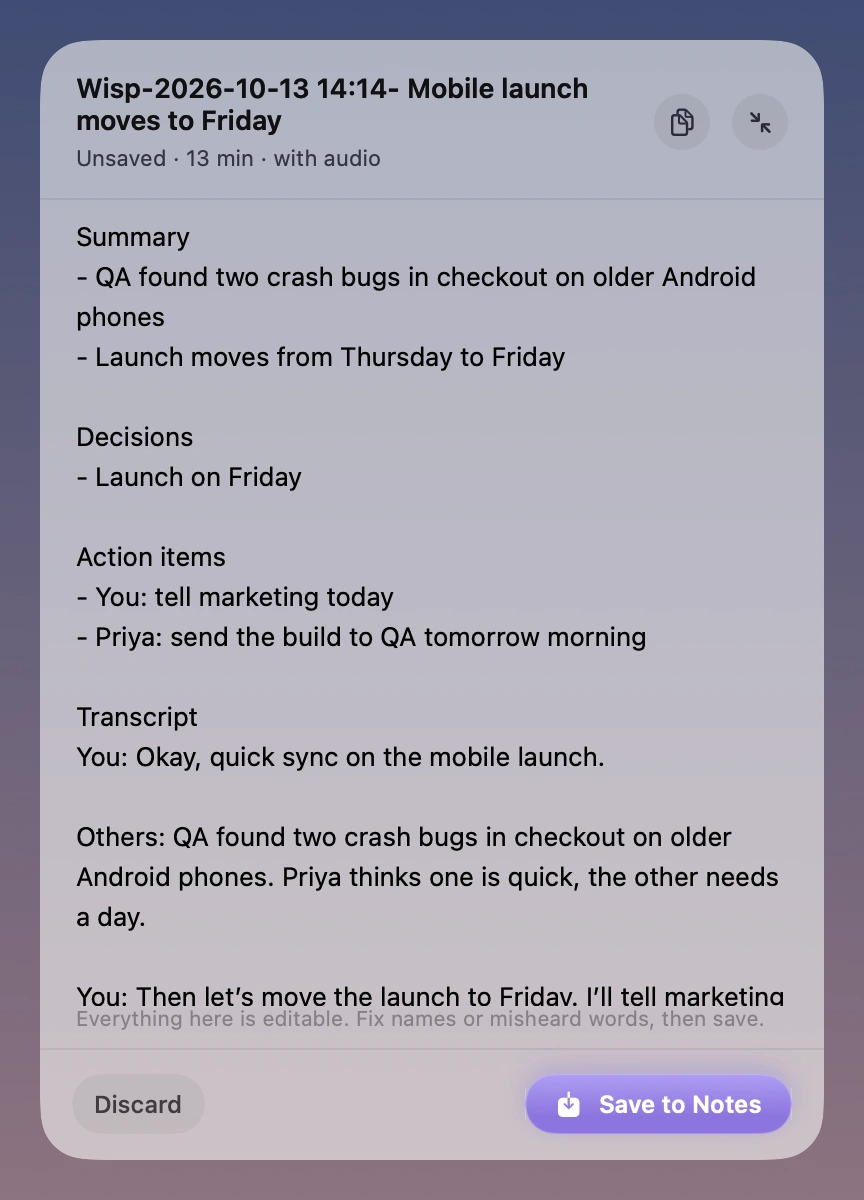
Notetaker captures your microphone and system audio. With Apple Intelligence available, it turns the transcript into a summary, decisions, and action items for you to check.
Review and edit the draft before saving it to Apple Notes. Calendar access is optional and can help name a note from the event happening now. Notes follow the sync settings you already chose in Apple Notes.
Wisp is a local Mac app with a license per Mac. There is no shared workspace, seat administration, or centralized transcript library. Contact us if you have purchasing questions for several Macs.
An Apple silicon Mac on macOS 26 or later. AI summaries, Smart cleanup, and rewriting need an available Apple Intelligence model.
Speech processing happens on your Mac. When you insert text into another app or save to Apple Notes, that app’s own storage and sync settings apply.
Explain the bug, the constraints, and what a good fix looks like. Wisp puts your words into the editor or terminal you already use.
Read moreStart with a rough paragraph, a headline, or an entire train of thought. Say it into your writing app and shape it from there.
Read moreJoin early access. A 7-day trial and $9 launch price when Wisp is ready.
macOS 26+ · Apple silicon