
Wispr Flow alternatives for Mac
Start with Apple Dictation if you want to speak into text fields using what is already on your Mac. Consider VoiceInk if you want to choose a local speech model. Wisp is for Apple silicon users who want dictation and meeting notes in the same on-device app. Keep Wispr Flow if you regularly dictate across Mac, Windows, and phones or rely on its shared dictionary.
By the Wisp team · Sources checked
Quiet Machines makes Wisp. This comparison uses published product documentation and pricing. The workflows below are checklists you can try with your own setup.
The options at a glance
Scroll the table to see every column.
| Tool | Where speech is processed | Useful when | Price and availability |
|---|---|---|---|
| Wispr Flow | Internet required for voice transcription | You dictate across devices or use shared terms and snippets | Free tier. Pro listed at US$15 per user per month on monthly billing |
| Apple Dictation | Check Keyboard settings for your language and Mac | You want basic dictation directly into text fields | Included with macOS |
| VoiceInk | Local or cloud, depending on the transcription and cleanup models you choose | You want model choice and a custom dictionary | Solo license listed at US$25 once for one Mac |
| Wisp | On your Mac after speech assets are installed. Smart features need Apple Intelligence | You want a local dictionary, technical vocabulary, and meeting notes alongside dictation | US$9 once per Mac with the early-access offer. Planned regular price US$49 |
Check what you use Flow for
Make a list of the apps and devices where you actually dictate. A Mac-only alternative can cover Slack, a terminal, and a draft in Notes, but it leaves a gap if the same vocabulary needs to follow you to a phone or Windows PC. Flow’s shared dictionary and snippets are especially useful when a team needs to spell the same names.
If offline use is the reason you are switching, check transcription and cleanup separately. A local speech model can produce a transcript while an optional cloud model still handles the rewrite. With Apple Dictation, check the processing notice in Keyboard settings for the language you plan to use.
Try the same three dictation tasks
Run the same short script in every app after installing its speech models. Count the edits you need before sending the result. That is easier to judge than a general claim about accuracy.
- Dictate a message with a date and an amount. Check punctuation and whether the text goes to the right field.
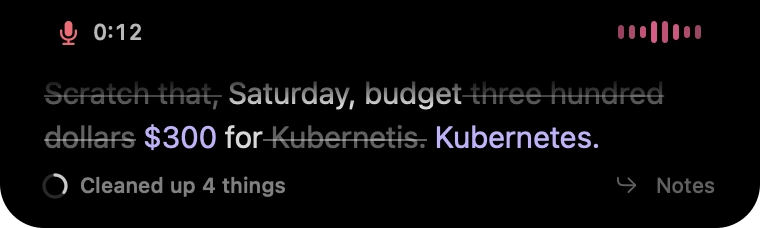
- Dictate a coding instruction with terms such as Kubernetes, Supabase, and a project name. Add one custom term and repeat the sentence.
- Turn off Wi-Fi and repeat a short dictation. Check whether it transcribes, cleans up, and pastes. Turn Wi-Fi back on before comparing any cloud modes.
When Wisp fits
Wisp is a good fit if most of your writing happens on one Apple silicon Mac running macOS 26 or later and you want fewer corrections on technical terms. You can use a personal dictionary, copy text without auto-pasting, and keep meeting notes in the same workflow.
Wisp is in early access. Joining the waitlist reserves the launch offer. If you need a public download today, or depend on an Intel Mac or a mobile keyboard, start with the compatible options in the table.
Common questions
Does Wispr Flow work offline on Mac?
Wispr’s documentation says voice transcription needs internet access. Local history and cloud storage preferences are separate from transcription.
Which option is included with a Mac?
Apple Dictation is included with macOS. Open Keyboard settings to check the processing and internet requirements for your setup.
Can I bring my Flow dictionary to another app?
Start by keeping a list of your recurring terms and snippets. Check the destination’s import options before switching. Adding your most-used terms by hand is a practical first pass when the formats differ.